

Advanced settings
Open Advanced settings in the main view for the settings that change the shape of the output.
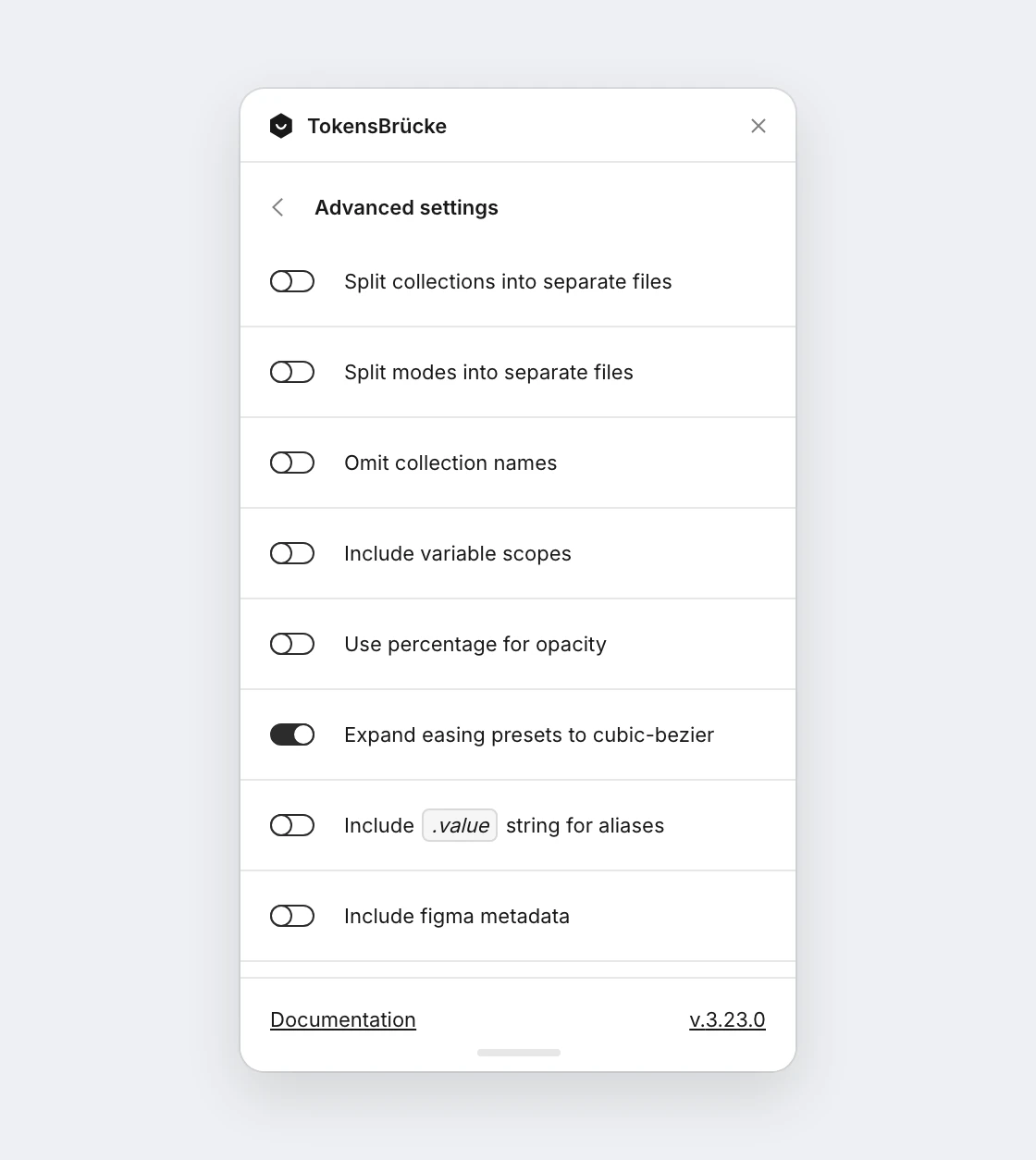
Split collections into separate files
Section titled “Split collections into separate files”Is off by default. When enabled, each Figma variable collection is exported as its own file instead of a single merged JSON.
- Download JSON — produces a
design.tokens.ziparchive containing one{CollectionName}.tokens.jsonper collection. - CLI — writes individual
{CollectionName}.tokens.jsonfiles into the directory specified by--output. - Push to a server — the GitHub, GitHub PR, GitLab and GitLab MR servers commit one
{CollectionName}.tokens.jsonper collection in a single commit. TheFile namefield of the server becomes the folder they are written into, e.g.tokens→tokens/{CollectionName}.tokens.json.
This is useful when you want to keep component-level token files separate (e.g. button.tokens.json, card.tokens.json).
To push only some of the collections to a Git server, see Collections to push.
Split modes into separate files
Section titled “Split modes into separate files”Is off by default. When enabled, each mode of a variable collection is exported as its own file. The top-level key in each file is the collection name, and every token’s value is resolved for that mode.
- Download JSON — produces a
design.tokens.ziparchive containing one{CollectionName}/{ModeName}.tokens.jsonper mode. - CLI — writes individual
{CollectionName}/{ModeName}.tokens.jsonfiles into the directory specified by--output. - Push to a server — the GitHub, GitHub PR, GitLab and GitLab MR servers commit one
{CollectionName}/{ModeName}.tokens.jsonper mode in a single commit, inside the folder set in the server’sFile namefield.
Collections with a single mode are exported as a single {CollectionName}.tokens.json file.
Splitting by mode needs the DTCG 2025.10 format setting on. With it off, each collection is exported as a single file.
For example, a collection color with modes light and dark produces color/light.tokens.json and color/dark.tokens.json:
{  "color": {    "primary": { "$type": "color", "$value": "#ffffff" }  }}
// color/dark.tokens.json{  "color": {    "primary": { "$type": "color", "$value": "#000000" }  }}
This is useful for generating a resolver.json file that references per-mode token files.
Omit collection names
Section titled “Omit collection names”Is off by default. When enabled, the plugin drops the top-level collection name from the output and merges all variables into a single flat namespace (variables are still grouped by the / separator in their names).
// Without "Omit collection names" (default){  "Primitives": {    "color": {      "primary": { "type": "color", "value": "#000000" }    }  },  "Semantic": {    "button": {      "background": { "type": "color", "value": "{color.primary}" }    }  }}
// With "Omit collection names"{  "color": {    "primary": { "type": "color", "value": "#000000" }  },  "button": {    "background": { "type": "color", "value": "{color.primary}" }  }}
Alias references, including the ones in styles, are also rewritten so they point to the flat path (the collection prefix is removed).
Include variable scopes
Section titled “Include variable scopes”Is off by default. Each Figma variable has a scope property. The plugin allows you to include scopes into the generated JSON. It will be included as an array of strings without any transformations.
{ "button": { "background": { "type": "color", "value": "#000000", "scopes": ["ALL_SCOPES"] } }}Use percentage for opacity
Section titled “Use percentage for opacity”Is off by default. When enabled, opacity values will be exported as percentages instead of normalized decimal values. This affects number variables whose scopes are all OPACITY or COLOR_OPACITY (see Scopes limitations).
// Without percentage format (default){  "opacity": {    "type": "number",    "value": 0.1  }}
// With percentage format{  "opacity": {    "type": "string",    "value": "10%"  }}
Expand easing presets to cubic-bezier
Section titled “Expand easing presets to cubic-bezier”Is on by default. Figma’s EASING variables hold either a custom curve or one of Figma’s named presets, and the API only returns numbers for the custom ones — a preset arrives as just its name.
When enabled, the named bezier presets (Linear, Ease in, Ease out, Ease in and out and the three “back” variants) are expanded into their curve, so every bezier easing exports as a spec-valid cubicBezier token. When disabled, they keep the name Figma gave them.
// Expanded (default){  "easing": {    "$type": "cubicBezier",    "$value": [0.42, 0, 1, 1]  }}
// Not expanded{  "easing": {    "$type": "string",    "$value": "ease-in",    "$extensions": { "figmaType": "EASING" }  }}
Custom beziers always export as cubicBezier and are unaffected by this setting.
Spring presets (Gentle, Quick, Bouncy, Slow), custom springs and Hold are always exported as strings regardless of the setting — DTCG has no spring type, and Figma exposes no curve to expand a spring into. See Motion variables for the full mapping.
Include .value string for aliases
Section titled “Include .value string for aliases”Is off by default. Allows you to include .value string to the end of the path for aliases. It will be added to the alias string.
{ "button": { "background": { "type": "color", "value": "{colors.light.primary.10.value}" } }}If the format is DTCG:
{ "button": { "background": { "$type": "color", "$value": "{colors.light.primary.10.$value}" } }}Include Figma metadata
Section titled “Include Figma metadata”Is off by default. Allows you to include Figma metadata like variableId, codeSyntax, etc. into the generated JSON. It is merged into the existing $extensions object alongside mode.
Exported styles get their styleId in $extensions.figma. Color styles also get every paint of the style in $extensions.figma.paints, see color styles with several paints. Text styles keep their $extensions.styleId too, for compatibility.
"button": { "background": { "type": "color", "value": "{colors.primary.10}", "$extensions": { "mode": { "light": "{colors.primary.10}", "dark": "{colors.primary.90}" }, "figma": { "codeSyntax": {}, "variableId": "VariableID:1:4", "collection": { "id": "VariableCollectionId:1:3", "name": "Primitives", "defaultModeId": "1:0" } } } }}